
Password protection is essential to securing your account, if you don’t have it, then everyone else will. However, many people use weak passwords, which can be hacked easily and cause account loss. A survey showed there are still a lot of users use “123456”, “password” or “qwert123” as their passwords, and they even repeatedly use such weak passwords on all websites.
The good news is that you can use a password manager to generate strong and secure passwords while increasing the overall security of your accounts. First of all, download some software. This can be done by Googling for a good password manager, but here are some specific sites where you can get all your requirements.
Passwords are essential to your digital identity, mainly if you use the same password on all your accounts and devices. If a hacker hacks your password database and finds out that you use the same pattern for different sites, they may be able to gain access to all your accounts.
I recommend you by using a password manager, like DualSafe Password Manager. It will automatically store any online passwords and helps you generate new, strong ones at the touch of a button.
What is A Password Manager
A password manager is a tool. It can help you manage all your passwords and logins, so they’re easier to remember.
By using it you can store all your credentials, including banking and credit card details, personal information like birth dates and phone numbers, login codes for websites, and more.
If you use the same password everywhere, it’s easy to forget them. If you have to manually enter each one into different sites every time you log in, that adds extra time to your day. And if hackers manage to get their hands on those logins, it could be disastrous.
A password manager solves your problem by storing all your logins in one place. The software will tell you when it’s time for a new password, so there’s no longer a reason for you to carelessly write down or input any of your passwords on any site where they might be used online.
The best password managers are encrypted using 256-bit AES encryption protocols. It means that even if someone could crack the encryption key used by the system itself, they wouldn’t be able to access any data stored by the program itself.
Why Password Manager is Important?
Unfortunately, many computers and devices on the internet are open to cyber-attacks because passwords are easy to break. If you use a password manager, it is easily possible for you to secure every login, account, and device with one single strong password for all budgets and web applications.
Protecting your passwords is essential. If you’ve used a password manager before, you know how easy it is to lose track of your personal information several times a year.
A password manager is important for protecting your accounts, not only those that require strong security like banking and credit card accounts.
The Free & Unlimited Passwords Management – DualSafe Password Manager
DualSafe Password Manager is a free tool that keeps your passwords safe and secure. It can be used on any Windows device and several web browsers, like Google, Opera, Microsoft Edge and Brave.
DualSafe Password Manager usesthe primary security tool that stores all of your passwords. Then it backups all your passwords that you can use when you need. In addition to storing passwords, DualSafe allows you to log into websites and apps from anywhere in the world using just one username and password combination. This makes it easy to use all of your online accounts without worrying about remembering or typing in different usernames whenever you want to log in somewhere new.
Features of DualSafe Password Manager
Manage Multiple Accounts: The DualSafe Password Manager allows you to store different passwords for different accounts on your computer. Creates many accounts as you need and save them all in one place, so they are easy to access later. And you can store unlimited passwords by free.
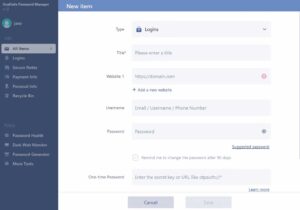
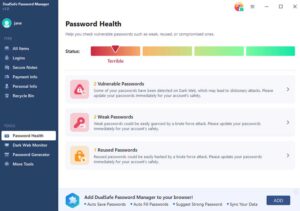
Password Health Checker: After you save your account and password, DualSafe Password Manager can automatically check if your password is a qualified strong password. In this way, you can change your password in a customized way.
Secure Storage: DualSafe uses the special unique triple encryption and advanced protection features: zero-knowledge security architecture, AES-256, and HTTPS. So it can protect your data from prying eyes or hackers who might want to steal your information. It makes almost impossible for anyone else to get their hands on your personal information unless they know exactly where it is stored. Besides,
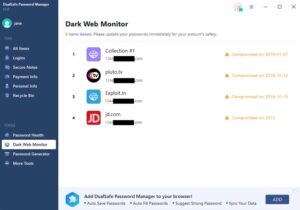
Dark Web Monitor: The DualSafe Password Manager can automatically check whether your passwords have been leaked to the dark web. And it will show you some tips to change the passwords. In this way, you can protect your online accounts.
Auto-fill feature: The auto-fill feature allows you to choose one of the pre-made templates to start filling out your login information on websites and apps as soon as they appear on the screen. This means you don’t have to enter all your data manually.
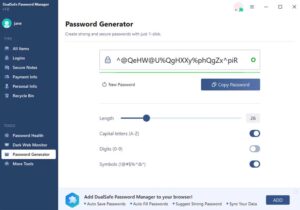
Password generator: If there’s any uncertainty regarding the password length or complexity, DualSafe Password Manager lets you generate random passwords using its built-in random number generator (RNG). This ensures that all your login details remain secret even if someone tries cracking them using brute force hacks.
Conclusion
No matter how smart and sophisticated you are with passwords in general, there exists a strong possibility of getting breached by hackers. A password manager helps keep your login credentials as safe as possible.
DualSafe Password Manager is a fantastic choice for those who want to protect their passwords adequately. It has an automatic password generation function and allows you to change your passwords easily from one account to another. In addition, it uses AES 256 encryption, giving it the best security possible and protecting the identity theft of its users.